Inlägg

Visar inlägg med etiketten Fedora

Software updates and versioning
Bild
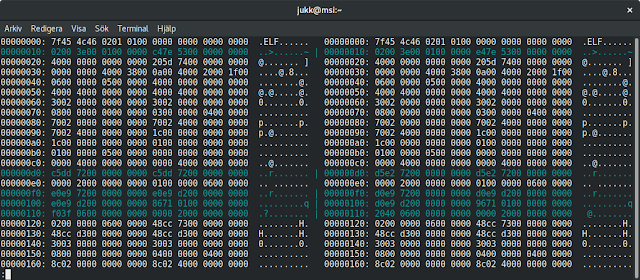
When publishing software, it is custom to update software version when releasing an update. Why would you just silently replace a released software package with an updated one without changing version? In most cases this means that users downloading the package for the first time will get the latest package, but users that have downloaded the software previously will receive no notification about an update (assuming that there is an upgrade mechanism such as apt, yum or dnf, or in the Windows world maybe a custom software updater). If the update isn't worth pushing out to all users, why not just wait with pushing out the change until next official release? I don't know, but it feels like hiding something. Or maybe the publisher is just clueless. The only thing I could think of that would justify doing this, is if the software installation package has some minor issue (or completely broken thus preventing any installation). But not updating version numbers is just, well... weird...

RuneScape NXT client for Fedora

RuneScape is a massively multiplayer online role-playing game ( MMORPG ) created by Jagex Ltd.. Their Linux client allows you to play the game natively also in Ubuntu. The client is written in C++ and uses OpenGL rendering. For reference, the Ubuntu client is available here: https://www.runescape.com/download . It is possible to play also in other Linux distributions, if you use the same libraries as in Ubuntu. This Fedora rpm is created from the Ubuntu package with two extra libraries that are privately installed. They don't interfere with the rest of the system. I don't guarantee that the client will work in the future, but as of now it works fine. There is a 64-bit package available for Fedora 25 and 26. Because the RuneScape client is proprietary, it isn't possible to host the package in the usual package repositories. For now it is provided here from my own private repository. To enable this RuneScape repository in Fedora: sudo dnf -y config-manager --add...

Steelseries Arctis 7 headset in Linux

Bild
UPDATE. This headset works without modifications in Linux after the changes were committed to pulseaudio in 2017.  The Steelseries Arctis series headsets are very comfortable. You can wear this headset all day long thanks to the comfortable head strap. Steelseries Arctis 7 There are three models, Arctis 3, 5 and 7. The last one is the most expensive and has wireless connection. Arctis 5 is basically the same without wireless (only USB connection). Arctis 3 has only analog inputs. I've got the Arctis 7 model and of course I'm using it with Linux. There were some issues setting it up. It works fine in Alsa, the device is recognized. You do have to adjust sound levels, at least the mic has too low sound level. Use alsamixer on command line to adjust all volume levels for the headset to 100% (the two outputs and one input). But Pulseaudio has some issues. Only the mono device (chat output) and microphone is visible. This is because the headset uses a non-supported co...

Razer Deathadder on Linux

Bild
I've got a Razer Deathadder mouse connected to one of my PCs. This is a quite popular gaming mouse. It doesn't work fine in a standard Linux distro (at least on Fedora). The resolution is too high and it isn't possible to turn down. In the past I used a script and xinput to lower the mouse sensitivity . But there is a driver for Linux created by the free software community, in this case by Michael Büsch . The driver automatically sets the resolution to something usable and you can set different profiles and tune it from the command line or using a GUI application (the latter which doesn't currently work on Fedora due to missing python libraries, but no big deal). I've been using this driver for a long time, first by compiling it from source, and later through the rpmsphere-release repostory at https://build.opensuse.org/project/show/home:zhonghuaren . At one point it stopped working and I found out that it hadn't been updated in a few months in t...

Two-factor authentication part 2 - 2FA with SSH

On any linux based server, it is possible to protect SSH with two-factor authentication using the Google Authenticator PAM module. This is actually easy to install and configure. Login to your SSH server and install the module. On Debian (or for instance Raspbian): sudo apt-get install libpam-google-authenticator On Fedora: dnf install google-authenticator Create the verification key for the user. I prefer to not allow root access to a server, so this step should be run as the user that should be able to login: google-authenticator You can answer y to most questions. Finally, you will get a QR code that can be scanned by your phone TOTP app (any standard TOTP application will do). Make sure to store the emergency codes in a safe place, such as a Keepass database or on a paper. Now you need to make a few changes, so that PAM (which is responsible for authentication on most linux systems) asks for the verification code in addition to your password when logging in thr...

Firefox Tracking Protection for all users

Bild
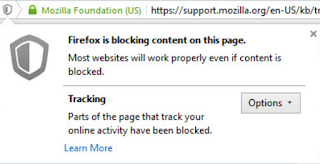
Firefox Tracking protection is a great feature used in Private browsing mode. But turning on Firefox tracking protection permanently has several benefits. According to researchers it makes pages load 44% faster and reduces data usage by 39%. You will also get rid of most personalized advertisement, thus the increased performance. Personally, I prefer to choose my advertisement myself. You can turn on the feature in Firefox by typing about:config in the location bar and hitting enter. Type and find privacy.trackingprotection.enabled and double-click it to toggle it to true. But how to turn this feature on for all users on the same PC ? Usually family members are not tech-savvy enough to mess around in the Firefox configuration interface. Behold, if you are an administrator, you can set a machine-wide setting. You can tell Firefox to read system preferences by creating a file defaults/pref/local-settings.js in the Firefox installation directory. Then set the default preferenc...

SleepyHead in Fedora Copr

Fedora Copr is an automated build system with a repository as output. You upload the source, select desired build systems (Fedora, Redhat) and get one or more rpm packages in repositories automatically. There is now a Fedora 24 Copr repository for SleepyHead: https://copr.fedorainfracloud.org/coprs/johanh/sleepyhead/ This means you can install SleepyHead from command line with: sudo dnf copr enable johanh/sleepyhead sudo dnf install sleepyhead As long as the repository is enabled, you will also receive any updates to SleepyHead when updating your system with dnf update.

SleepyHead Fedora rpm package

Bild
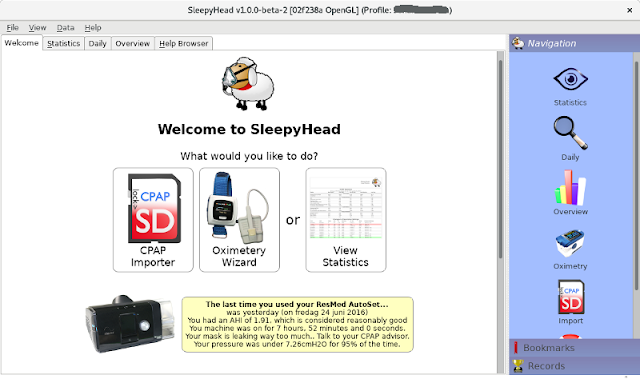
Sleep apnea It is not so bad getting a diagnosis for sleep apnea. Some people are not even aware of their condition. But it is important to get help, because your health could suffer. Some people might feel a little tired, but other could develop serious illnesses. For more information, see https://en.wikipedia.org/wiki/Sleep_apnea . CPAP units So I got this CPAP unit (almost for free because of our Nordic national health insurance). It is locked down, so I can't get any useful data directly out of it. But there is an SD card that is meant to be analyzed by my doctor. And there are free software on the Internet. SleepyHead Meet SleepyHead: http://sleepyhead.jedimark.net This is a very nice and free (GPL3) cross-platform program. Works in Windows, Mac and Linux. It is able to import data from an SD card of the most common CPAP units. There is also support for a few pulse oximeters. Below is a screenshot of the welcome screen. It is important to note that you...

Enabling Hibernation in Fedora 23

By default, Fedora doesn't enable hibernation (suspend to disk). Basically what you need is a big enough swap partition. Then it has to be added to fstab and Grub. Initramfs also has to support resuming from hibernation. On my laptop (MSI GE60) unfortunately the swap partition was too small. Fedora recommends that a swap partition should be half the size of RAM without hibernation and 1.5 the size of RAM with hibernation with 8 GB - 64 GB of RAM [1] . This laptop has 12 GB of RAM, but only a 6 GB swap partition. The partition has to be extended to 18 GB. There is a 250 GB SSD with 174 GB of space in /home (ext4 on LVM). I had to reduce the home partition to 162 GB to free up space for the swap partition. Of course, I had to free up enough space in the filesystem first. It is better to have a few times more free space than the amount to be reduced. Resizing an LVM/ext4 /home partition I don't recommend doing this, unless you have knowledge about partitions and LVM. Yo...

Using Dropbox from command line in Fedora

Dropbox is a file hosting service operated by Dropbox Inc. that offers easy cloud storage on multiple platforms. Note that Dropbox is proprietary software, but offers a free account with up to 2 GB of storage [1] . Personally I've used Dropbox to sync files between PCs and also phones. In Fedora linux, you can install Dropbox from the RPM Fusion repository [2] . This is basically an installer and command line client script for the binary Dropbox daemon (application) that then has to be separately installed by each user. There is also a plugin for nautilus, the file manager: nautilus-dropbox. To install, simply issue on the command line as root (or sudo): dnf install dropbox nautilus-dropbox You could also download the program from Dropbox home page and install it manually [3] . I prefer using the Fedora package, then it will be nicely integrated also in Gnome on a desktop PC. The following instruction is how to install and configure on a headless PC, using only the comm...

Easy Minecraft installation in Linux

This is an installation script for Minecraft on Linux. It installs the Minecraft launcher in the system, so that all users can easily start and play Minecraft. It creates icons and a shortcut to the launcher. The script is an improved version of this script (github https://gist.github.com/wvega/728367 ) When the user starts Minecraft, it will download a copy of Minecraft to the user's home directory, exactly like when manually installing Minecraft. This script works fine on Fedora, but I imagine it should work on most Linux distros. The only requirement is that Java is installed somewhere. The script assumes there is a link to Java at /usr/java/latest/bin/java or in /usr/bin/java, otherwise it will exit with an error. The script downloads the Minecraft launcher, and installs it system wide. Sometimes the Minecraft launcher address has changed and then of course the script must be updated. Download the shell script here or from github . Do "chmod +x minecraft-insta...

Laptop touchpad stops working after suspend

The MSI GE60 Laptop has an Elantech touchpad that has always had some problems working in Linux after suspending and resuming the laptop. Edit: Found some notes. It seems to have worked fine in Fedora 18, but in Fedora 19 after a synaptics driver update (xorg-x11-drv-synaptics-1.7.1-3.fc19.x86_64) it went totally nuts. Edge scrolling stopped working and after suspend/resume, the touchpad notification icon was flashing over the GDM login prompt, alternating with the on and off icon image. The touchpad was also turned off after reboot and couldn't be turned on except for in the Gnome system settings. After a few updates, some of the problems were fixed, except for the problem that it is turned off after suspend/resume. At least now with Fedora 20, which is currently installed on the laptop, the touchpad always stops working when resuming from suspend, and the hardware button to turn on doesn't affect its state. It is using the psmouse kernel driver and synaptics in Xorg: ...

Commercial software on Linux - RAR

I found that I had an old registration key for WinRAR laying around. Since I don't use Windows any more at home, I checked and found that there is indeed a commercial Linux version of the software available nowadays. RAR is a proprietary archive format that was widely used in the 90's and the next decade when the Internet became a popular place to share software and media files. It has better compression ratio than ZIP, has strong encryption and very good error recovery capabilities. I have some memories from my time as a student of keeping a WinRAR binary on a floppy and use it to decompress and compress files transferred from and to the Internet. I'm not going to debate over FOSS vs. commercial software in this post. If we weigh in such arguments, there are no reasons to use anything else than the LGPL licensed 7Z (p7zip) or tar with bzip2, gzip or xz (and their parallel variants), but that was not the point of this post. There is also a freeware unrar program and l...

Preventing normal users from Shutting Down or Rebooting PC

The default policy in linux is often that normal users can shut down or reboot a PC, even if other people are logged in. When using a desktop PC as a server or if you often leave your applications open, you don't want that to happen. This is a question that comes up many times on the Internet. The problem is that the components in linux change and not every distribution uses the same components. In linux, only root has the power to shut down or reboot. Many linux distributions use Policykit for rules to override this and let the normal users shut down and reboot. In Fedora 21, to override the default rules, create a new rule with the following command: sudo nano /etc/polkit-1/rules.d/60-noreboot_norestart.rules  Paste the following text: polkit.addRule(function(action, subject) {     if (action.id == "org.freedesktop.login1.reboot" ||         action.id == "org.freedesktop.login1.reboot-multiple-sessions" ||   ...