Inlägg

Visar inlägg med etiketten command line

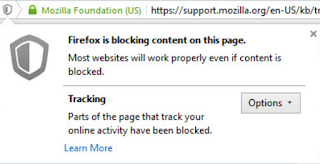
Firefox Tracking Protection for all users
Bild
Firefox Tracking protection is a great feature used in Private browsing mode. But turning on Firefox tracking protection permanently has several benefits. According to researchers it makes pages load 44% faster and reduces data usage by 39%. You will also get rid of most personalized advertisement, thus the increased performance. Personally, I prefer to choose my advertisement myself. You can turn on the feature in Firefox by typing about:config in the location bar and hitting enter. Type and find privacy.trackingprotection.enabled and double-click it to toggle it to true. But how to turn this feature on for all users on the same PC ? Usually family members are not tech-savvy enough to mess around in the Firefox configuration interface. Behold, if you are an administrator, you can set a machine-wide setting. You can tell Firefox to read system preferences by creating a file defaults/pref/local-settings.js in the Firefox installation directory. Then set the default preferenc...

Using Dropbox from command line in Fedora

Dropbox is a file hosting service operated by Dropbox Inc. that offers easy cloud storage on multiple platforms. Note that Dropbox is proprietary software, but offers a free account with up to 2 GB of storage [1] . Personally I've used Dropbox to sync files between PCs and also phones. In Fedora linux, you can install Dropbox from the RPM Fusion repository [2] . This is basically an installer and command line client script for the binary Dropbox daemon (application) that then has to be separately installed by each user. There is also a plugin for nautilus, the file manager: nautilus-dropbox. To install, simply issue on the command line as root (or sudo): dnf install dropbox nautilus-dropbox You could also download the program from Dropbox home page and install it manually [3] . I prefer using the Fedora package, then it will be nicely integrated also in Gnome on a desktop PC. The following instruction is how to install and configure on a headless PC, using only the comm...